Loading documents
A loader converts a source into documents with text, identity, and structure. Text and record loaders normalize decoded text. Docling loaders use the structure returned by Docling. The loader registry selects a default parser by extension, while record formats can produce one document per row or record.
Why it exists
Later ingestion stages need a consistent document model, even when sources differ. The loader preserves useful structure such as headings and tables. A document's key identifies it for updates; parser choice can change its text and the source locations available to citations.
How it works
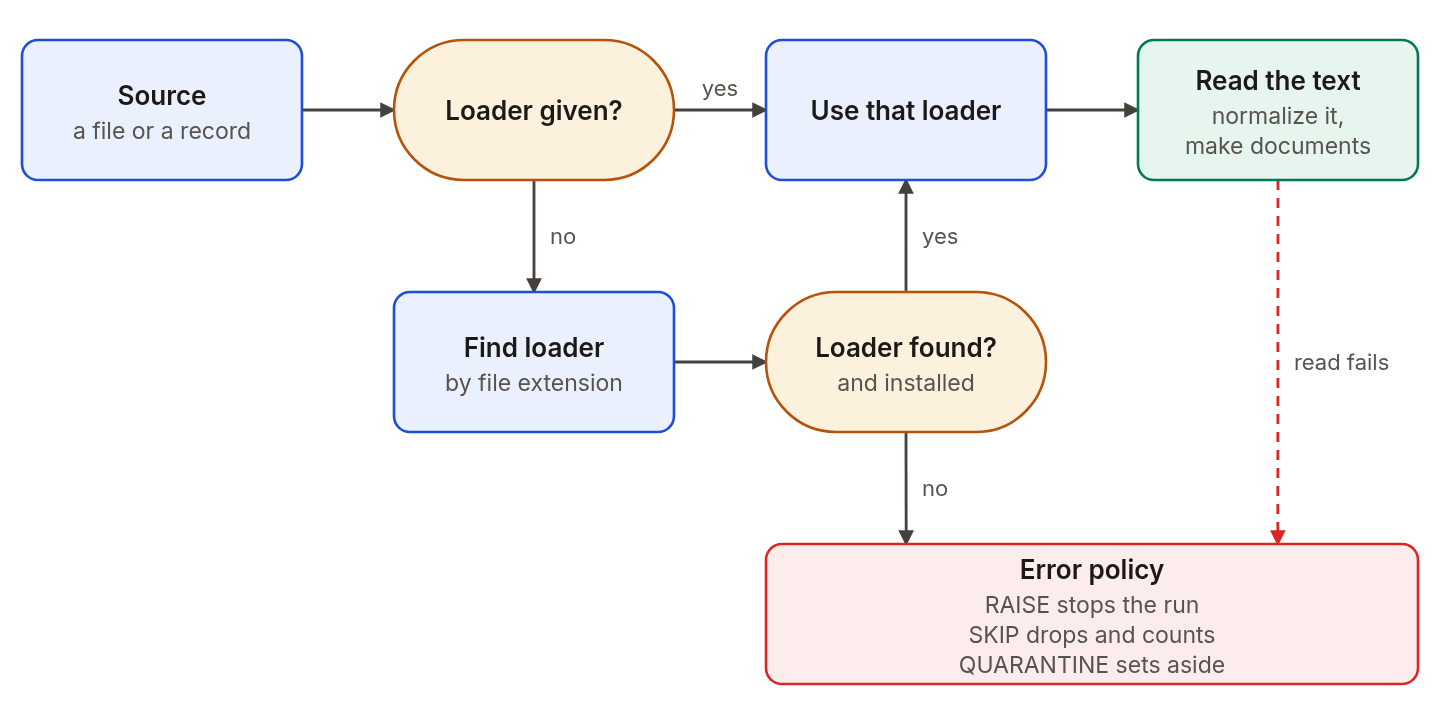
The loader comes from you or from the extension. A source that fails follows the error policy.
- Pick. You can pass a loader for a single file. Otherwise Agentic GraphRAG looks up the extension in its registry, which maps each extension to one loader. A missing optional extra is reported as a missing-extra error. A missing import from a base parser is an installation error and is not handled as a source error by the error policy.
- Read. Text and record loaders detect the text encoding. They remove a byte-order mark, change line endings to LF, and apply Unicode form NFKC by default.
ReadOptions.normalizationcan change each setting. Docling loaders parse the source through Docling instead of this text-decoding pipeline. - Build. The loader makes a document. A document holds the text, the source location, the format, a content hash, the loader name and its sections. A section holds a heading, its depth and the units of content under it: paragraphs, lists, code, formulas, footnotes, tables and figures when the parser supplies them.
Prose and record sources
A prose source makes one document for each file. A record source makes one document for each record: a CSV row, a JSON Lines line, or an element of a JSON array. A record document takes its text from one column. You can name the column. If you do not, Agentic GraphRAG uses a column called text, body, content or description, and otherwise the last column.
Supported formats
| Format | Extensions | Loader |
|---|---|---|
| Plain text | .txt, .log | Core, one section |
| XML | .xml | Core, the text of the elements |
| Markdown | .md, .markdown | Docling |
| HTML | .html, .htm | Docling |
| AsciiDoc | .adoc, .asciidoc | Docling |
| Word, PowerPoint, Excel | .docx, .pptx, .xlsx | Docling |
.pdf | Docling, needs the docling extra | |
| Images | .png, .jpg, .jpeg, .tif, .tiff, .bmp | Docling, needs the docling extra |
| CSV and TSV | .csv, .tsv | Core, one document per row or one for the table |
| JSON Lines | .jsonl, .ndjson | Core, one document per line |
| JSON | .json | Core, one document per array element, or one for an object |
| Chat files | .jsonl, .ndjson, .json | Chat loader, passed by you, one section per message |
The base install includes docling-slim for Markdown, HTML, AsciiDoc, Word, PowerPoint and Excel files; these formats need no model. PDF and image files need the full docling package and its layout and table models, installed by the docling extra. Agentic GraphRAG routes CSV and TSV to the core loader, which can make one document per row or one prose document for the whole source. The chat loader uses .jsonl, .ndjson and .json, but is not registered by default because the record loaders already claim those extensions. Pass it for a single file.
Sections
A section is a heading and the content under it. A PDF gets heading depth from its outline when Docling reports it. Without outline depths, Agentic GraphRAG reads dotted heading numbers such as "3.2 Results" only when Docling reports every heading at depth 1, the document has at least three headings, and at least half are numbered. Otherwise it keeps the heading depths reported by Docling. A nonblank prose document with stored text and no headings has one section with an empty heading. A record row has no sections. Chunks have page spans only when the loader supplies page provenance.
Example
You add report.pdf and notes.md in one call. The registry sends both files to Docling. Both become prose documents with sections. If the docling extra is missing, the PDF fails with a missing-package error, and the error policy decides whether the run goes on. The Markdown file still loads.
Design choices
Why does a document keep two hashes? The content hash is the hash of the document text, and it decides whether a document changed. A Docling document also records source_hash, the hash of the raw file bytes. Because Docling can export the same file as different text between versions, a Docling upgrade can change the content hash of an unchanged file and create a new version of it.
Why do offsets point into the normalized text? Every chunk offset counts characters in the text after normalization. If you need offsets that match the raw source, keep the text as it is with Normalization(bom="keep", newline="keep", unicode_form="none").
Why does each extension have its own loader? Different parsers preserve different structure. Docling reads AsciiDoc, Markdown, and HTML structure, while the core CSV loader gives each row its own identity. Choosing by extension avoids treating every installed parser as an equally good fit.
Why do PDF and image files need the docling extra? The base install includes docling-slim for the other listed document formats. The full docling package supplies the models used to parse PDF and image files.
Related
- Chunking describes the next stage.
- Ingest documents shows how to add each kind of source.
- Loaders API lists every loader and read option.