Quickstart
In this tutorial, you build a knowledge graph from one document, look at what Agentic GraphRAG stored, and ask the built-in agent a question about the document. The agent answers with numbered sources.
The tutorial takes about 10 minutes on a typical connection. Most of the time goes to installing the libraries.
What you need
- Python 3.11 or newer, and uv 0.6.9 or newer.
- A Neo4j database. Step 1 shows two ways to get one.
- An OpenAI-compatible LLM endpoint and API key for the agent in step 4.
What runs where
Your script runs on your machine, together with the embedding and extraction models. The graph lives in Neo4j. Only the agent calls an LLM.
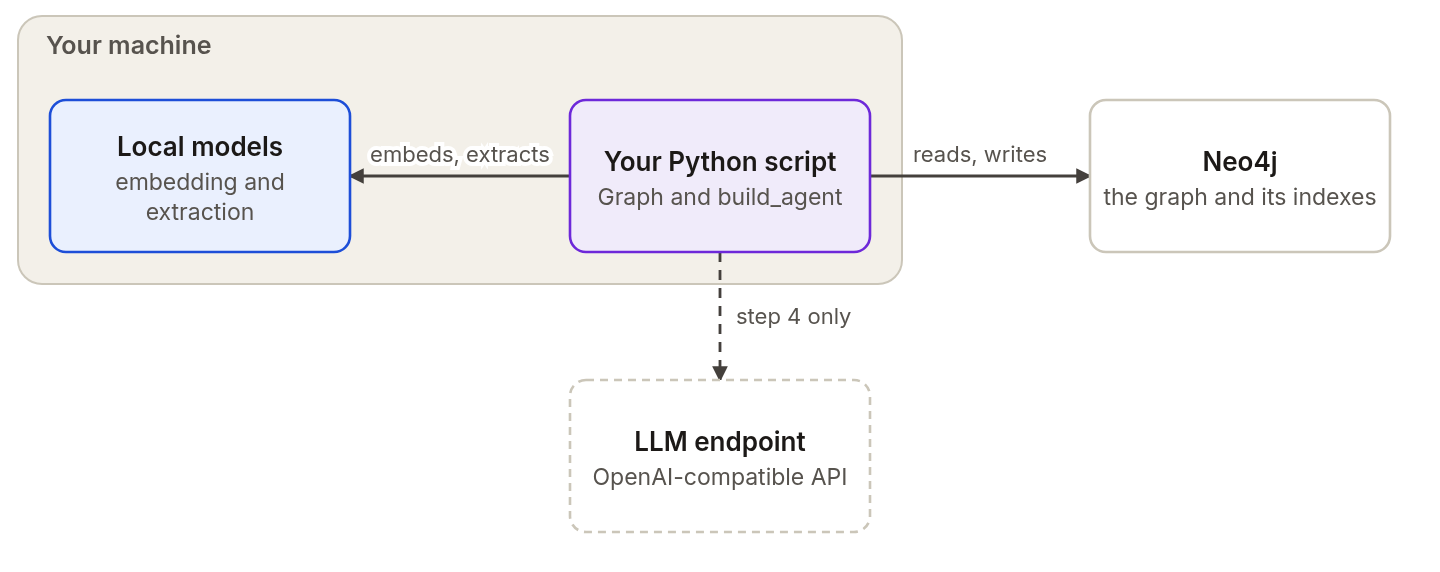
The script and the models run locally. The agent step calls your LLM endpoint.
Step 1: Get a Neo4j database
Make a folder for the tutorial:
mkdir agrag-quickstart
cd agrag-quickstart
Choose one of the two options and create a file named .env in the folder.
Use a free Neo4j Aura instance
- Open console.neo4j.io and sign in.
- Create a free AuraDB instance.
- Download the credentials file when Aura shows the password. Aura shows the password one time.
- Wait until the instance is running.
- Copy the credentials file into the tutorial folder and rename it
.env.
Run Neo4j on your machine with Docker
Start a Neo4j container. It needs about 30 seconds before it accepts connections.
docker run -d --name agrag-neo4j -p 7687:7687 \
  -e NEO4J_AUTH=neo4j/agrag-quickstart neo4j:5.26.0-community
Create the .env file:
NEO4J_URI=bolt://localhost:7687
NEO4J_USERNAME=neo4j
NEO4J_PASSWORD=agrag-quickstart
NEO4J_DATABASE=neo4j
Add your LLM endpoint to the same .env file. The agent reads these values:
AGENT_LLM_BASE_URL=https://your-endpoint.example.com/v1
AGENT_LLM_API_KEY=your-api-key
AGENT_LLM_MODEL_ID=your-model-id
Step 2: Install Agentic GraphRAG
Create a virtual environment and install the packages:
uv venv
source .venv/bin/activate   # On Windows: .venv\Scripts\activate
uv pip install "agentic-graphrag[neo4j,extract,agents]" --torch-backend=auto
The --torch-backend=auto flag picks the PyTorch build for your machine, such as a CPU-only build when it finds no GPU. See Installation for the details.
Step 3: Add a document
Save this script as build_graph.py. It creates or replaces policy.md with a short example document, opens a graph with the operations schema, and adds the document with local GLiNER extraction:
import asyncio
from pathlib import Path

from agrag.embedding import build_embedder
from agrag.graphdb import build_graph_store
from agrag.ingestion import ExtractionSettings, Graph


async def main() -> None:
    document = Path("policy.md").resolve()
    document.write_text(
        "# Vendor policy\n\n"
        "## Approval\n\n"
        "A purchasing manager approves every vendor contract above 10,000 dollars.\n"
        "The finance team reviews the contract terms before the manager signs.\n\n"
        "## Renewal\n\n"
        "Contracts renew once a year. The manager must confirm each renewal in writing.\n",
        encoding="utf-8",
    )
    store = build_graph_store("neo4j")
    embedder = build_embedder("ibm-granite/granite-embedding-small-english-r2")
    try:
        graph = await Graph.open(
            schema="operations",
            graph_store=store,
            embedder=embedder,
            extraction_settings=ExtractionSettings(mode="gliner"),
            max_llm_pairs=0,
        )
        result = await graph.add(document, return_chunks=True)
        print("documents:", result.ingestion.documents)
        print("chunks:", len(result.chunks))
        print("entities extracted:", result.extraction.entities_extracted)
        print("relations extracted:", result.extraction.relations_extracted)
    finally:
        await store.close()


asyncio.run(main())
Run it:
python build_graph.py
The script prints the number of documents, chunks, entities, and relations that this run produced. The document is one document with at least one chunk.
Step 4: Ask a question
Save this script as ask.py. It builds the agent and limits it to the document you added. The scope uses the resolved path of the file, because a file document's key is its resolved path.
import asyncio
from pathlib import Path

from agrag.agents import AgentLLMSettings, build_agent
from agrag.embedding import build_embedder
from agrag.graphdb import build_graph_store


async def main() -> None:
    document = Path("policy.md").resolve()
    store = build_graph_store("neo4j")
    await store.connect()
    embedder = build_embedder("ibm-granite/granite-embedding-small-english-r2")
    try:
        agent = build_agent(
            graph_store=store,
            embedder=embedder,
            scope=frozenset({str(document)}),
            project_id="quickstart",
            agent_id="researcher",
            llm_settings=AgentLLMSettings.from_openai_compatible_env(),
        )
        result = await agent.ainvoke(
            {
                "task_name": "vendor-policy",
                "question": "Who approves a vendor contract? Cite your sources.",
            }
        )
        print(result["status"])
        print(result["answer"])
    finally:
        await store.close()


asyncio.run(main())
Run it:
BAML_LOG=off python ask.py
BAML_LOG=off stops BAML from printing every LLM call. On Windows PowerShell, set $env:BAML_LOG = "off" first.
The script prints the run status and the answer. The status says whether the run answered or reached a limit. The answer ends with a Sources list, and each number in the text refers to a passage the agent read. The wording of the answer varies with your model.
Run the script again with the same task_name. Agentic GraphRAG continues the task from its recorded events and steps.
Step 5: Look at the graph
Agentic GraphRAG stores the graph in Neo4j, so you can query it with Cypher. Save this script as inspect_graph.py. It lists the entities that extraction found:
import asyncio

from agrag.graphdb import build_graph_store


async def main() -> None:
    store = build_graph_store("neo4j")
    await store.connect()
    try:
        rows = await store.execute_read(
            "MATCH (e:_Node) "
            "WHERE e.merge_key IS NOT NULL AND NOT e:ResolvedEntity "
            "RETURN [l IN labels(e) WHERE l <> '_Node'][0] AS label, "
            "e.name AS name ORDER BY label, name"
        )
        for row in rows:
            print(row["label"], "|", row["name"])
    finally:
        await store.close()


asyncio.run(main())
Run it:
python inspect_graph.py
Entity nodes carry the label _Node and a merge_key property. The query keeps nodes that have a merge_key and skips resolved entities.
What you just built
- One document with its sections and chunks. Each chunk keeps its heading path, its position in the file, and an embedding.
- Entities from the schema that the extractor found in the chunks.
- A task named
vendor-policywith the messages and tool results of the agent run, stored in the same graph.
Next steps
- Knowledge graph: read what the nodes and edges in your graph mean.
- Ingest documents: add files, directories, and text.
- Find and cite evidence: search passages and check citations from Python.
- Run the MCP server: give an MCP client access to the graph.
- Record decisions and review them: tie a decision to its evidence.