Features
The groups below list what Agentic GraphRAG does. Most groups link to the page that explains the group in detail.
Read the files you already have
- Many ways to add documents. Add a file, a folder, a pattern that matches many files, a list of paths, plain text, or documents you built yourself.
- Common formats work out of the box. Plain text, logs, XML, Markdown, HTML, AsciiDoc, Word, PowerPoint, and Excel files are read directly. PDF and image support is an optional part of the install.
- Tables of records become documents. Each row of a CSV or TSV file, and each record of a JSON or JSON Lines file, becomes its own document. You can name the column that holds the identifier.
- Chat exports keep their shape. A conversation file is read with one section for each message.
- Structure is kept. Headings, sections, tables, and figures stay in the graph. PDF pages keep their page numbers and positions.
- Text is cleaned consistently. The text encoding is detected, and byte-order marks, line endings, and Unicode forms are normalized. You can change each of these choices.
- One bad file does not stop the run. You choose whether a failing source stops the run, is skipped, or is set aside with the reason.
- Changed files update their document. A file is identified by its full path, so adding a changed file updates the document that is already stored.
See Loading documents and Ingest documents.
Split documents along their structure
- Chunks follow the document. Sections are packed into chunks in reading order, and a small chunk carries on into the next section so that short sections do not each become a tiny chunk.
- Tables stay readable. A table that fits is kept whole. A larger table is split into groups of rows that each repeat the header row, and tables never share a chunk with running text.
- Every chunk knows its place. A chunk records its heading path, the sections it covers, and its position as character offsets or as page positions.
- Headings help the search. The heading path is placed in front of the chunk text when the chunk is embedded, and consecutive chunks are linked in reading order.
- Settings changes are picked up. Each chunk is stamped with the chunker and its settings, and a document is chunked again when those settings change.
See Chunking and Configure chunking.
Build a graph around your own schema
- Describe your domain. Write the schema in code, in a YAML or JSON file, with Pydantic classes, or by importing an OWL or RDFS ontology.
- Start from a preset. Begin with the default schema or a ready-made preset for operations or legal documents, then override, exclude, or add to it. A schema can also be exported to JSON Schema, SHACL, or JSON-LD.
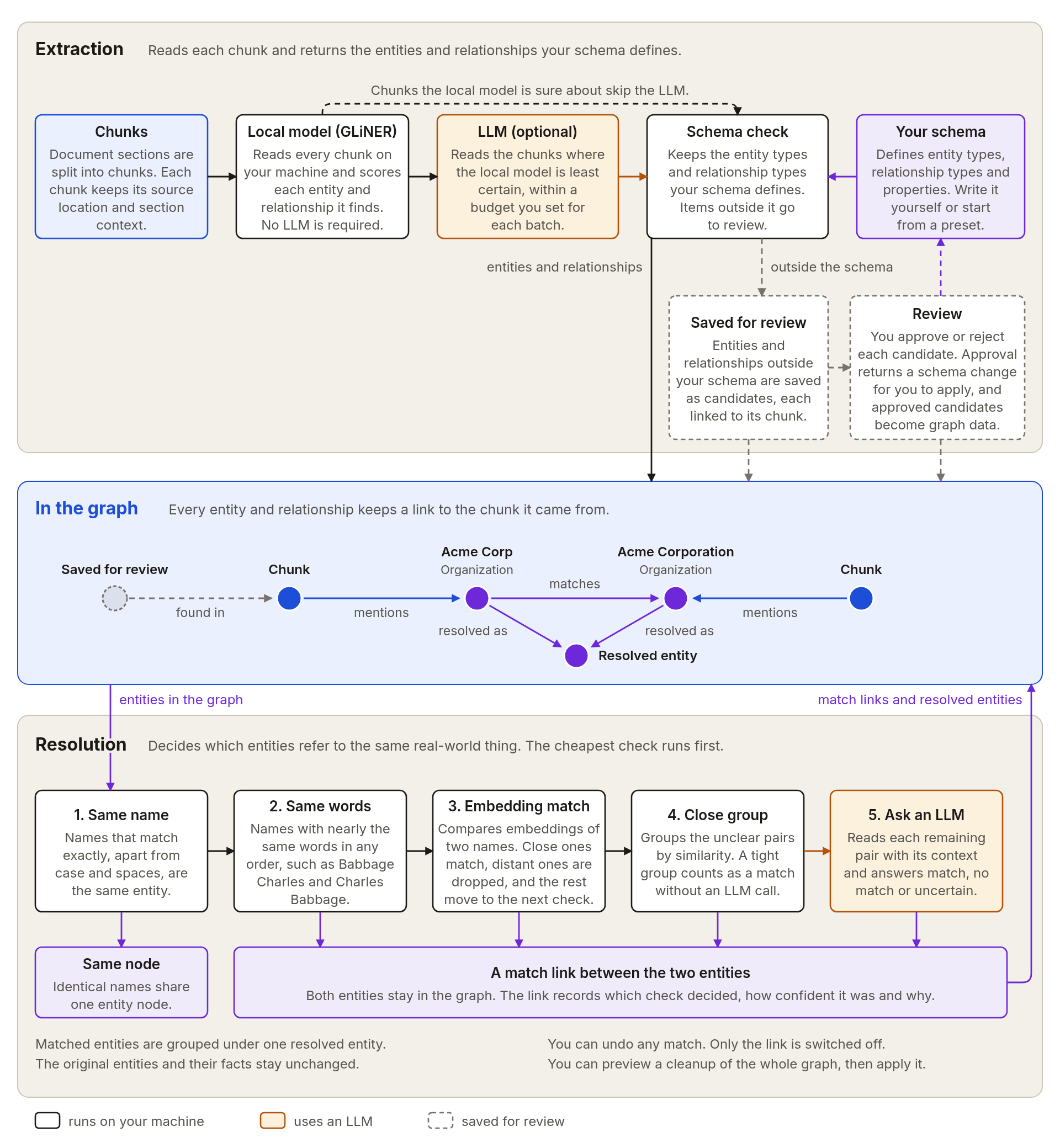
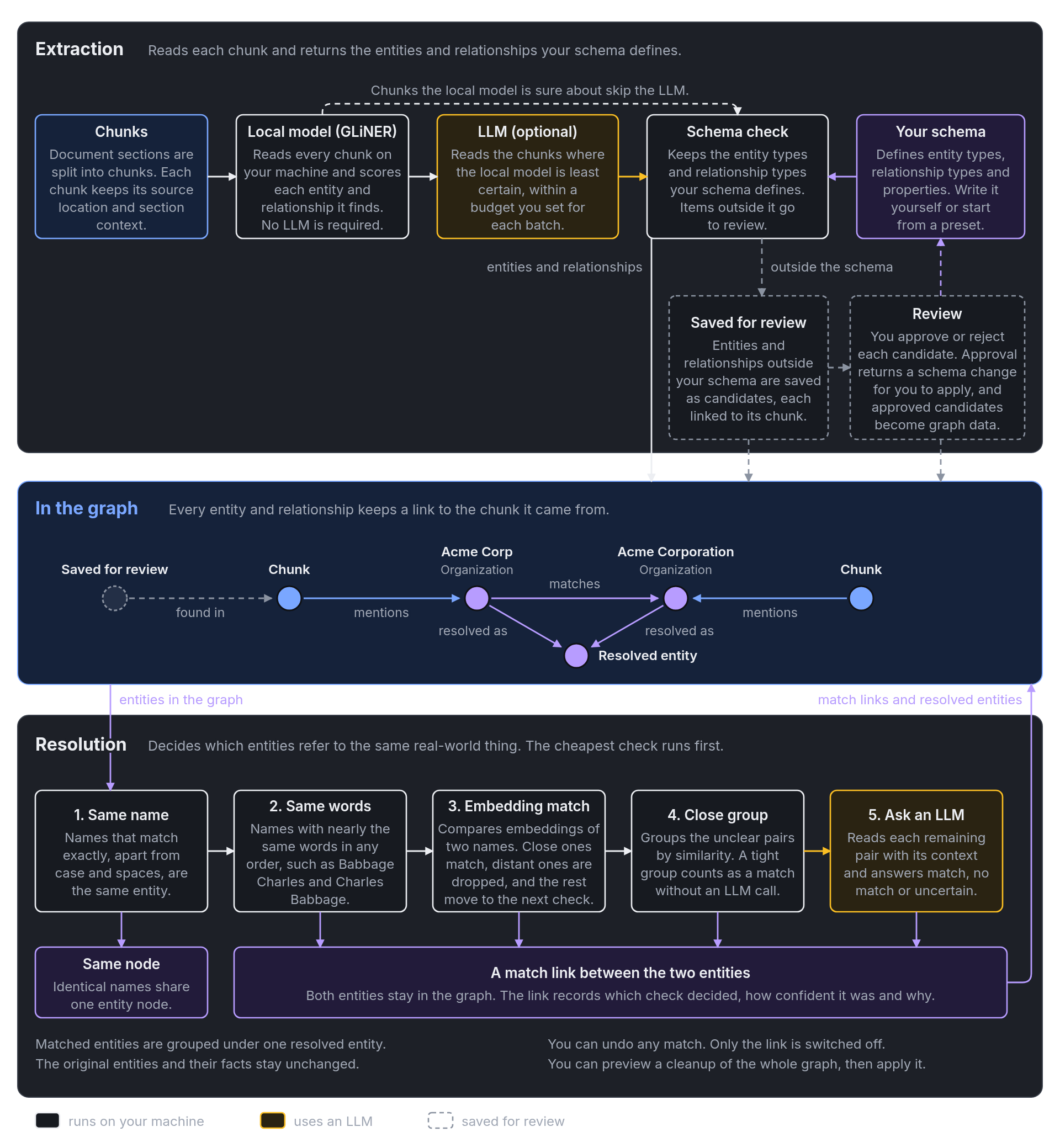
- Extraction runs on your machine first. A local model reads every chunk and finds entities and relations, so you can build a graph without an LLM key.
- An LLM reads the hard cases. You can add an LLM for the passages the local model is least sure about, and you set how much of each batch it may read. Entity types with properties go to the LLM, which fills in the values.
- Choose your model provider. Calls to an LLM work with many providers, with retries and with fallback or rotation across several models.
- Tune each label. Set separate confidence thresholds for each entity and relation type.
- Nothing outside your schema is lost. Items the models find that your schema does not allow are saved as candidates with links to their source passages.
- Review candidates. List, search, approve, or reject candidates. Approving writes a schema patch for you to review, and your own schema file is never edited. Approved candidates then become entities, relations, or properties.
See Define a graph schema, Choose an extraction mode, and Review candidates.
Merge duplicates without losing anything
- Same name, same entity. Mentions with the same label and text share one entity that records how often and where it appears.
- Looser matches become links. Similar spellings, close embeddings, and LLM-reviewed pairs are stored as links between entities. The originals and their relations stay in the graph.
- Matched entities are grouped. Each connected set of matches gets one combined entity that links to its members.
- Unclear pairs are left alone. A pair that no check can decide stays unmatched. It is never treated as a rejection.
- The LLM sees only the hard pairs. The most similar unclear pairs go to the LLM first, up to a limit that you set for each label.
- Preview before you apply. A graph-wide pass shows the matches it would make and writes them only when you ask.
- Re-check or undo. Re-check the entities you name after new evidence arrives, or turn off a single match.
- Conflicts are settled predictably. When two entities disagree on a property, the first value is kept. Conflicting descriptions are summarized by an LLM, with a plain join as the fallback.
- Concurrent work still converges. New entities are compared with everything already stored after each job, so two ingests that name one thing differently end up in one group.
- Orphans are cleaned up. An entity and its matches are removed when an update, delete, or purge takes away the last evidence for it.
See Entity resolution and Consolidate duplicates.
Keep the graph current
- Add again to refresh. Adding the same folder again skips unchanged documents and replaces the changed ones.
- Updates do only the work they need. A new version of a document is chunked and extracted again. If only extraction settings or descriptions change, the entities are extracted again and the chunks are kept. If only dates change, only the dates are written.
- Delete or purge. Remove a document from search and keep its history, or remove every version completely.
- Writes are all or nothing. Each document is written as one job with a lease, and nothing from a running job shows up in search until it finishes.
- Crashes recover on their own. The next time a graph opens, it rolls back or finishes any job that a crash left behind.
- Know the state of a document. A status check tells you whether a document is current, pending, failed, deleted, or unknown.
- Reports for every run. Each run returns counts for every stage, the failures with their details, and the true failure total. A progress callback receives a partial report after each batch of documents.
See Ingestion and Update and delete documents.
Keep the graph and its indexes in one database
- One database. The graph, its vector indexes, and its keyword indexes live in a single database. Neo4j is the supported database, on Aura or a local server.
- Efficient writes. Records are written in batches, and each failed record is reported by identifier.
- Indexes and constraints are created for you. Uniqueness constraints and native vector and keyword indexes are set up when a graph opens.
- Mismatched embeddings are caught early. The embedder is checked against the existing vector indexes before anything is written.
- Embeddings run on your machine. A local embedding model is used by default, and an alternative is available as an optional part of the install.
- Stable identities. A node keeps its identity when its labels change.
- Encrypted connections to remote hosts. The database password is only sent over an encrypted connection when the host is remote.
See Graph storage.
Search the graph and read the evidence
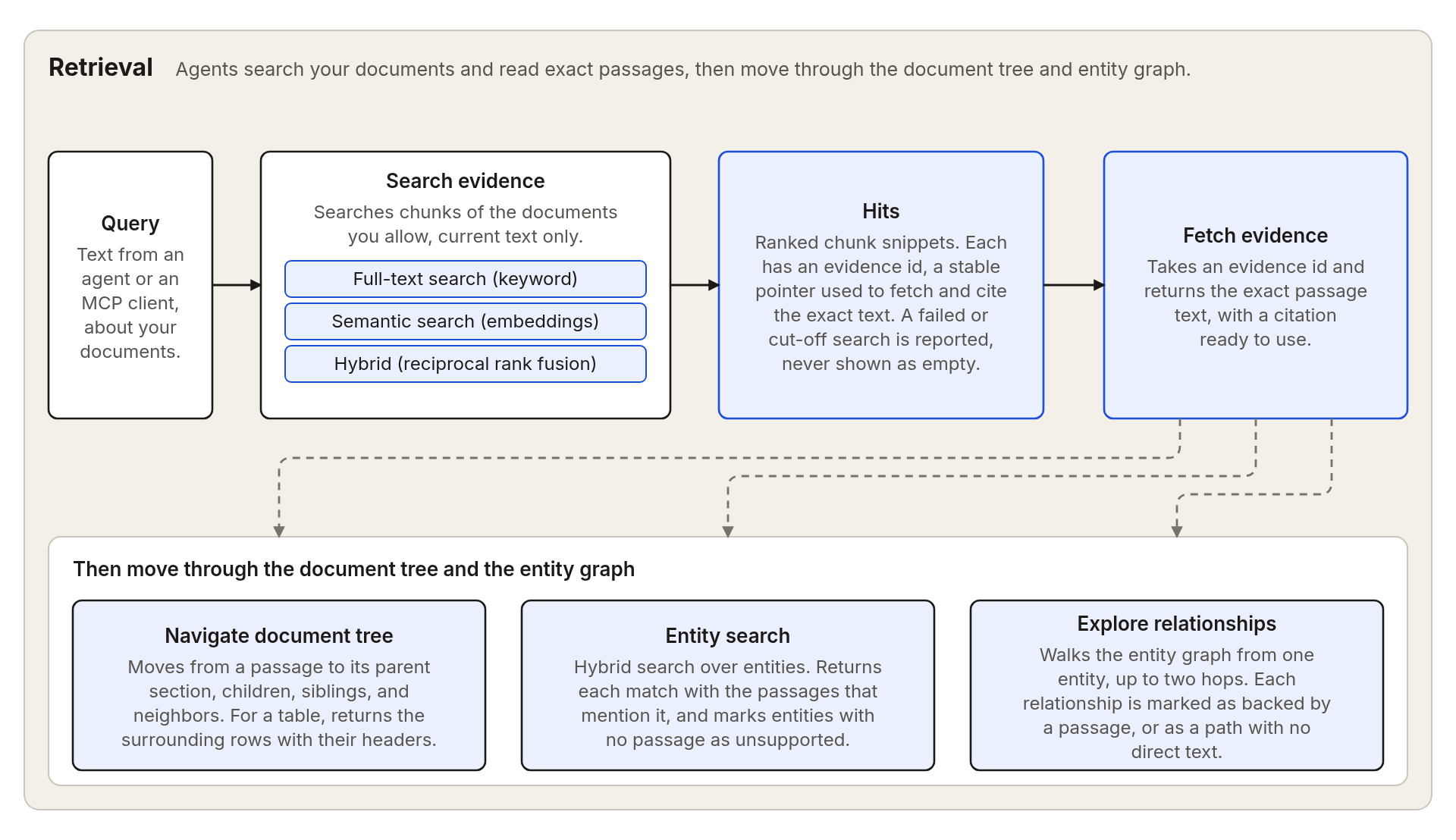
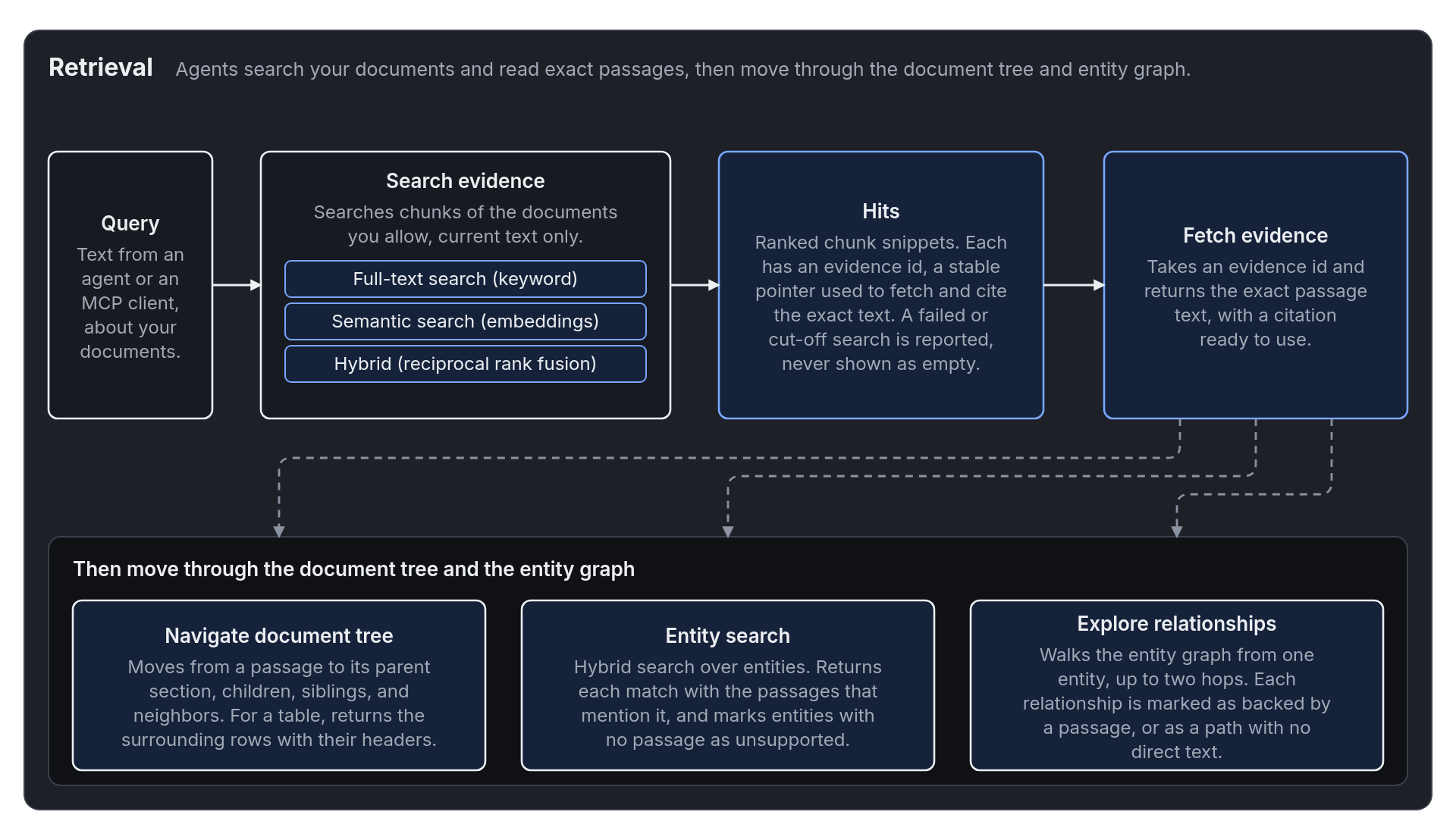
- Full-text, semantic, or hybrid. Full-text search matches keywords, semantic search compares embeddings, and hybrid search combines the two rankings.
- Only readable text is returned. Results come from the current text of documents in the caller's scope. Older versions and rows from unfinished jobs stay out.
- Exact text on request. Fetch returns the exact text behind a result, and says when the text was cut or covers only part of what was asked for.
- Entities lead back to passages. Find entities by name and by embedding similarity, and see the passages that mention each one.
- Follow relations. Walk outward from an entity a few steps, with relations that a passage supports kept apart from bare connections.
- Move around a passage. Go from a passage to its parent section, its children, its siblings, the previous or next chunk, or the rows around a table cell.
- Incomplete results say so. Failed search legs and cut-off results are reported, so an incomplete result is never mistaken for an empty one.
- Ranked results over the graph. Named recipes combine entity, passage, and community search, with an optional walk through the graph and a reranker.
See Retrieval and Find and cite evidence.
Cite a specific source version
- Citations name a version. Each reference points to one version of one document.
- Old citations still resolve. A citation to an earlier version returns its text and is labeled as superseded.
- Citations are checked. A check confirms that every cited passage was read in scope, and reports the ones that were not read, that belong to another document, or that are malformed.
- Readable references. Answers are rendered with numbered references and a Sources list, and a source becomes a link when it has a web address.
Answer broad questions with community summaries
- Groups of related entities. The entity graph is grouped into communities. You can preview the groups before writing them.
- Relations count by their evidence. Each relation is weighted by the number of passages that support it.
- Reports for every community. An LLM writes a title, summary, rating, and findings for the larger communities, and a simple template covers the rest.
- Searchable summaries. Each report is embedded, so broad questions can be answered from the summaries, and the summaries can be added to entity and graph results.
- Safe to rerun. Writing communities replaces the earlier groups in one step.
See Communities.
Remember tasks
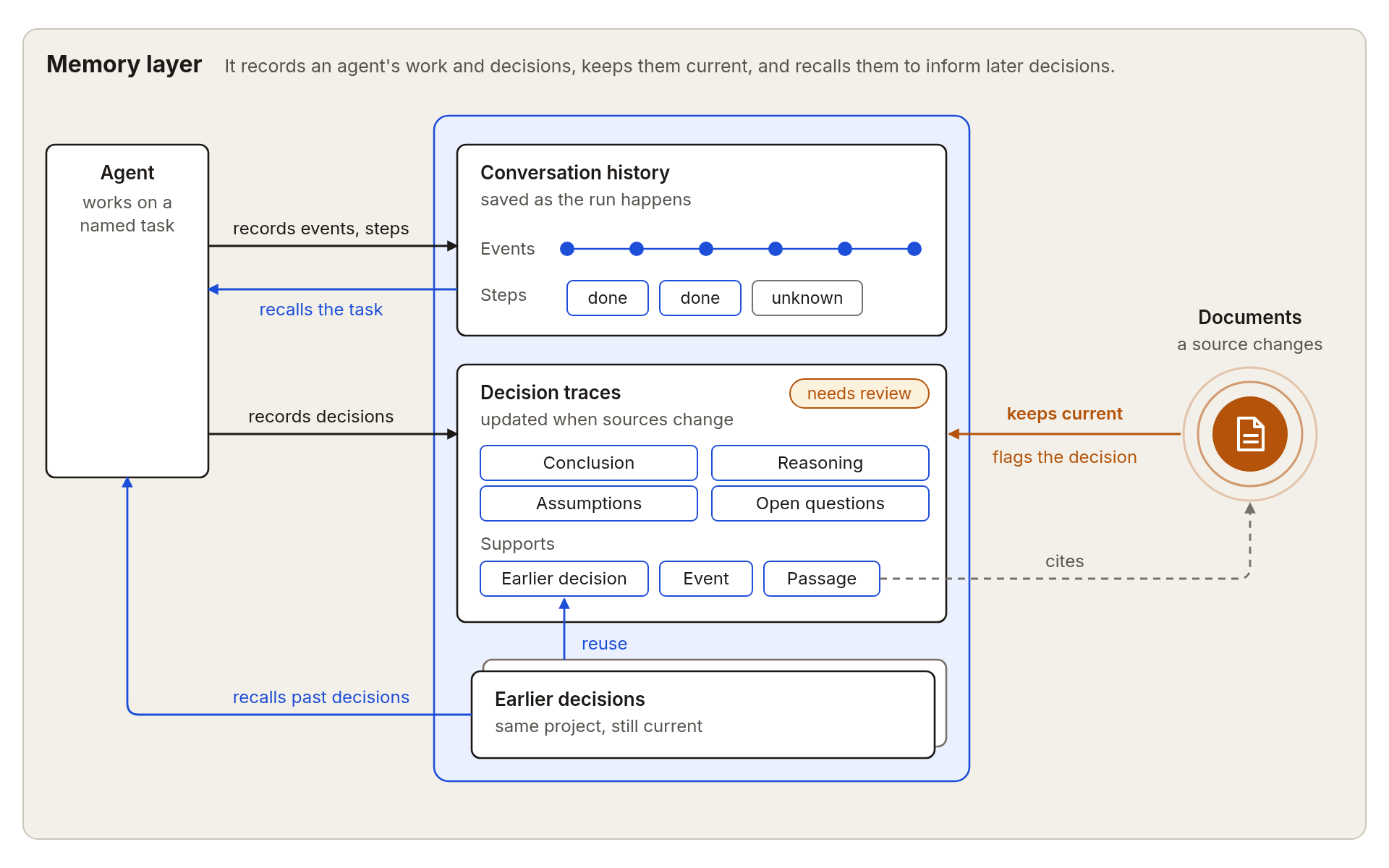
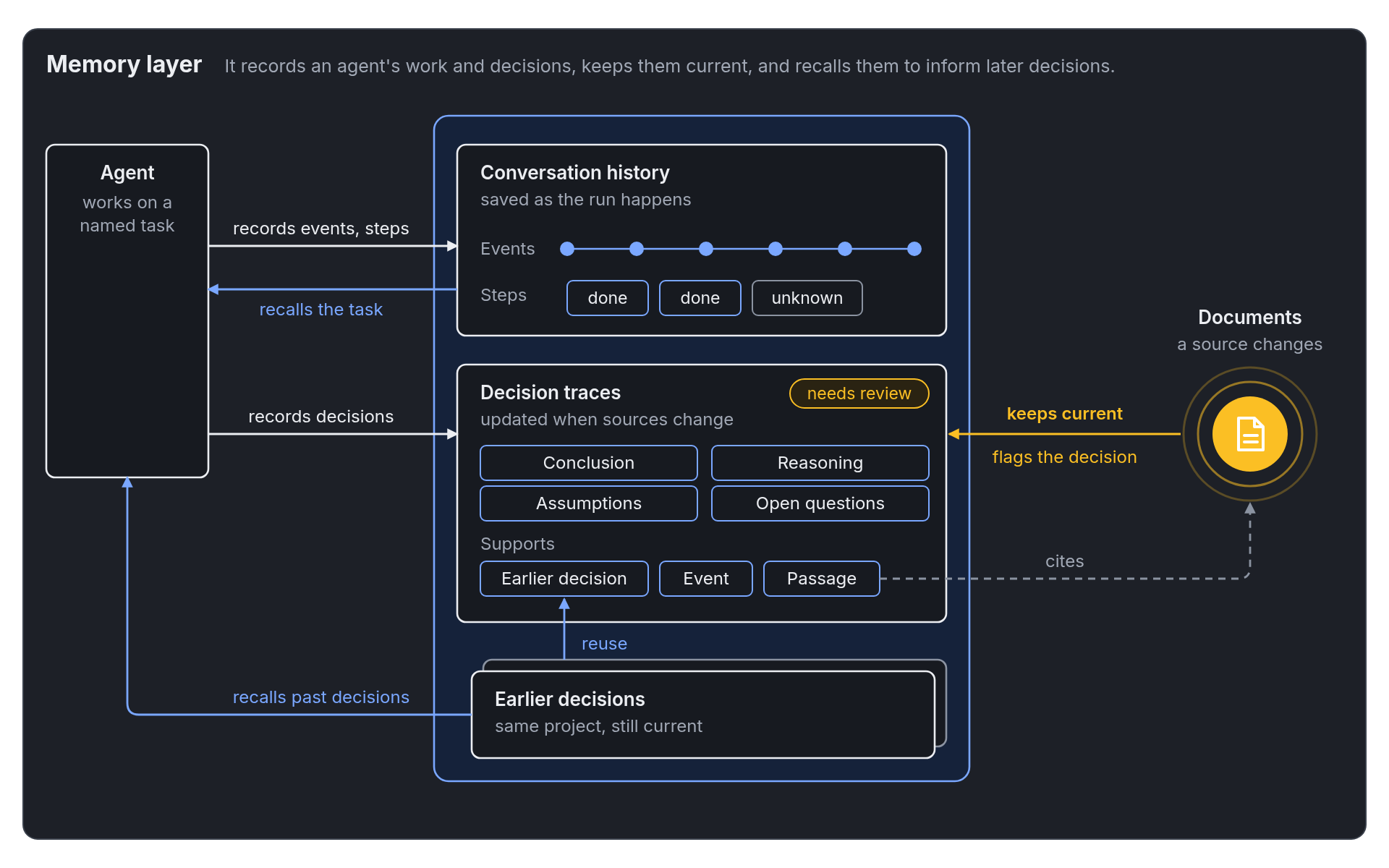
- Named tasks. A task has a goal, an ordered log of messages, tool calls, results, and notes, and named steps.
- Step states. A step is not started, in progress, completed, failed, or unknown.
- Resume with a short summary. A resumed task starts from the goal, step counts, active decisions, and decisions that need review.
- Finished work is reused. Completed steps are reused, and steps that were still running are marked unknown.
- Safe retries. A repeated write returns the saved result instead of recording twice.
- Retention controls. Redact the body of one event or delete a whole task with its events and steps.
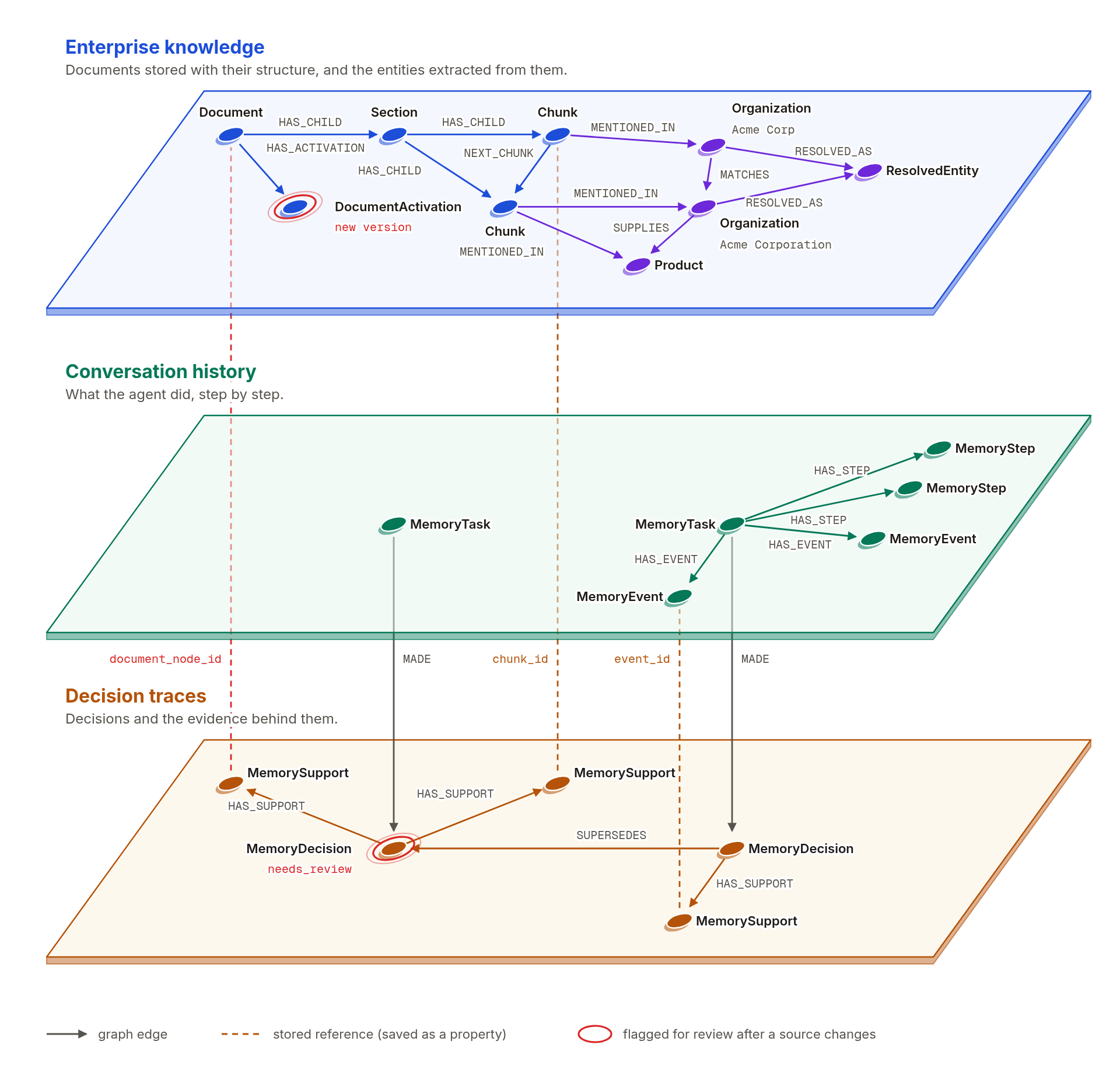
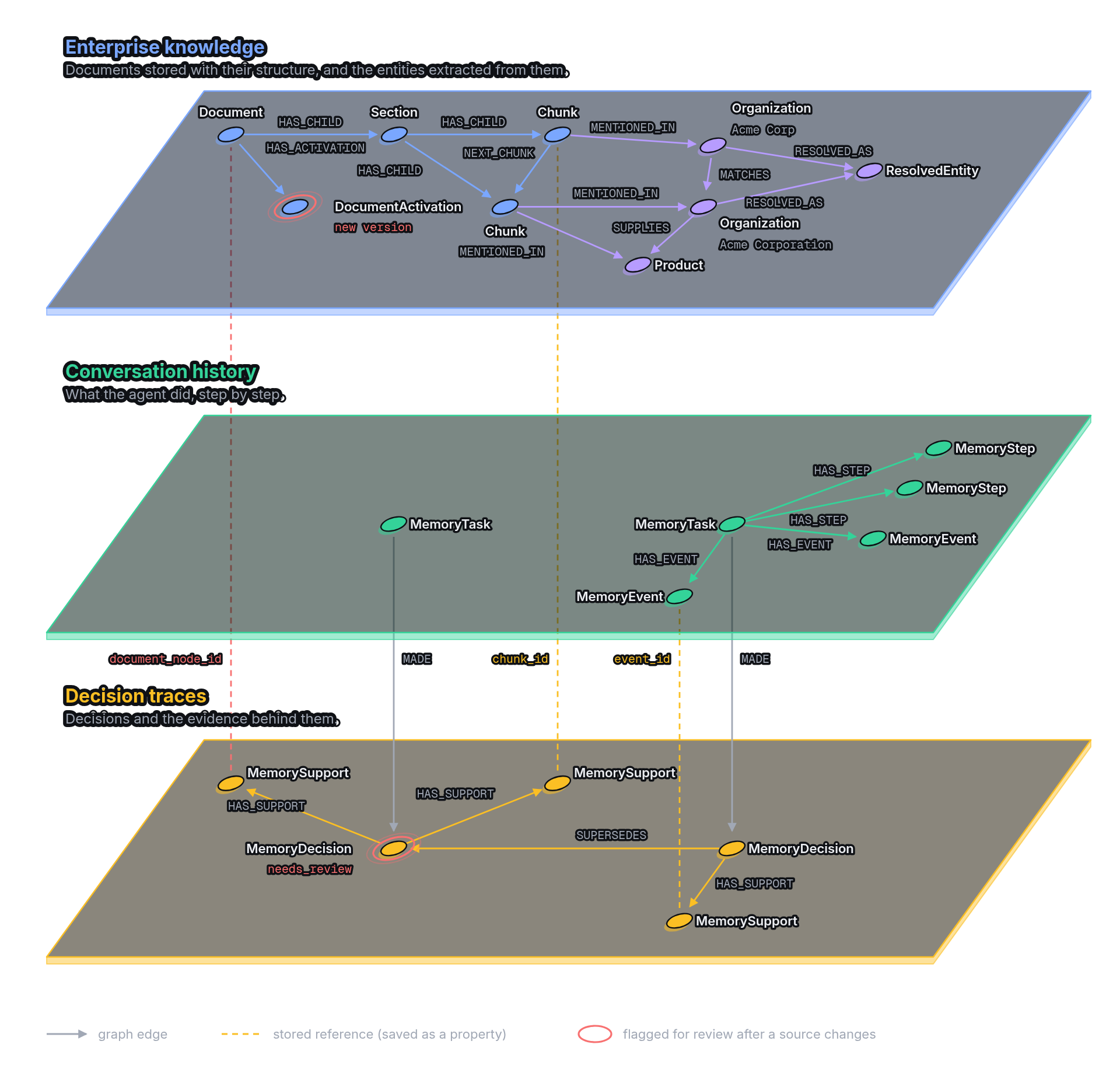
Record decisions that stay tied to their evidence
- Rich decisions. A decision stores a conclusion, a rationale, assumptions, and open questions.
- Typed supports. Supports can be document passages, task events, or other decisions.
- Explicit changes. Replace or reject a decision, and the earlier record and its support history stay.
- Source changes flag decisions. When a cited document gets a new version or is removed, the decision is flagged with the reason.
- Review spreads along dependencies. Decisions that depend on a flagged decision are flagged too, in small batches, so an interrupted review can continue.
- Reaffirm after reading. A decision is reaffirmed only after the current text of each cited document has been read.
- Spot conflicts and find precedent. List choices that different tasks decided differently, and search earlier decisions in the same project.
See Record decisions and review them.
Use the built-in agent
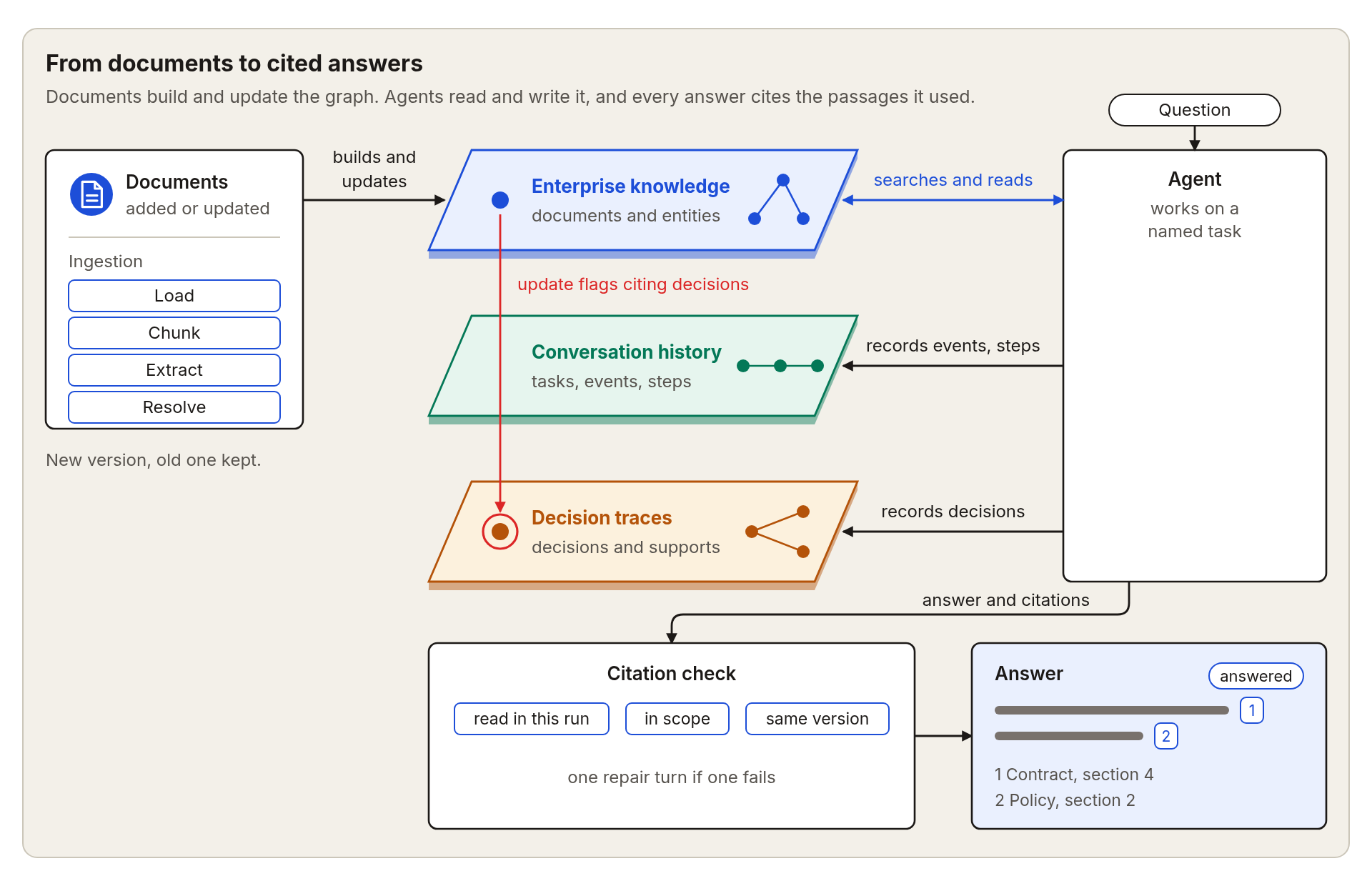
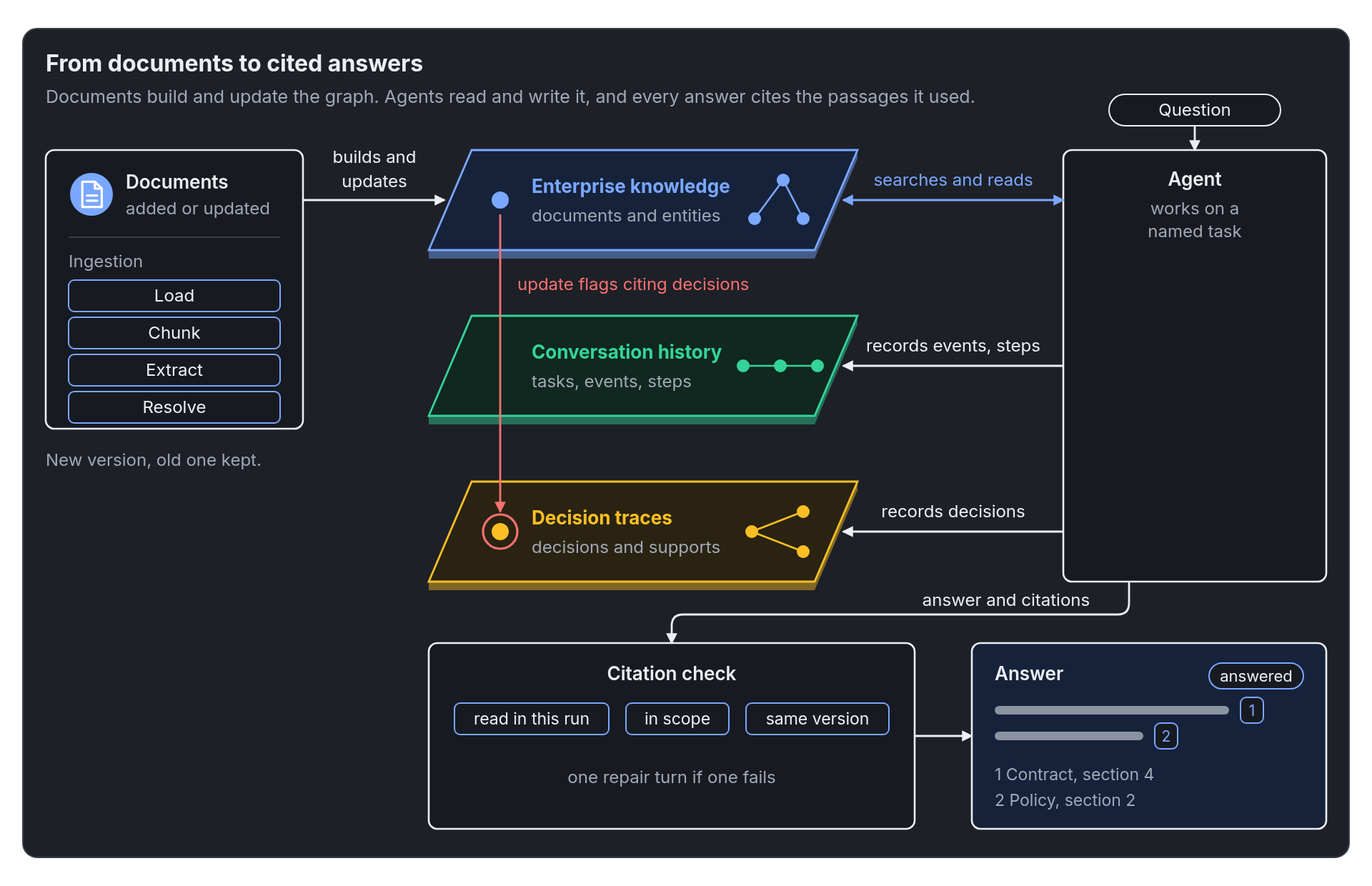
- Scoped to your documents. The agent is built for a fixed set of documents, a project, and an author, and it reads nothing else.
- Evidence tools. It discovers passages, finds entities, explores relations, moves between passages, and fetches exact text.
- A status for every run. A run ends as answered, short of evidence, partial, partially retrieved, out of budget, or unable to record its work.
- Checked citations. Citations are checked against passages read in the same run, and the agent gets one repair pass.
- Recorded work. Its messages, tool calls, and results are saved to the task log as the run goes.
- Limits you control. Set how many steps and tool calls a run may use.
- Your choice of model. Use one model, a fallback chain, or a rotation across Anthropic, OpenAI, OpenAI-compatible, and Google models.
See Agent loop.
Work with any MCP client
- A local server. One command starts a server that talks to your MCP client over standard input and output.
- Separate tools. Search, exact fetch, navigation, entity search, relation exploration, and citation checks are separate tools.
- Memory tools. Read and write tasks and decisions in a configured project.
- Read-only by default. Writing is switched on by the operator, and rejecting a decision has its own switch.
- The operator sets the boundaries. The documents and the project come from the server configuration, and a tool call cannot change them.
- Decisions rest on real reads. A decision can cite only evidence that the same server process fetched in full.
- Bounded results. Each result has a size limit and a deadline, and the server reports what it left out.
- Safe retries. A client can reuse a request identifier when it retries a write.
See Run the MCP server.
Show what happened
- Traces on request. Pass an OpenTelemetry tracer to the graph, the agent, the stores, the embedders, and the extractors. Without one, nothing is recorded.
- Every stage is covered. Spans cover loading, chunking, extraction, resolution, merging, storage, search, and LLM calls, including each attempt and its token counts.
- Agent runs are traced. Tool and model calls appear under your active span.
- Failures link to traces. Each failure record carries the trace and span it came from.
- Dropped items are counted. Entities and relations that were dropped are counted by kind, label, and reason.
See Observability and Trace spans.
Measure quality on your own data
- Answer scores. Score correctness, faithfulness, context precision, context recall, and citation accuracy with a judge model that you choose.
- Citation checks. Check each cited sentence against the evidence that sentence cites.
- Extraction and resolution scores. Score extraction against hand-written answers, and score duplicate groups with standard clustering measures.
- Agent run scores. Score agent runs from their traces.
- A ready-made script. Run the answer scores on your own documents and questions and get a table of results.
See Score on your own questions.
Fit your setup
- Configuration by environment. Every component reads its settings from environment variables or a file, with a prefix for each area.
- One endpoint or many. Point extraction, the agent, and the judge at one OpenAI-compatible endpoint, or give each its own.
- Smart change detection. Stored fingerprints of the schema and the extraction settings decide whether an update chunks again, extracts again, or skips the work.
- Install only what you use. Optional parts of the install cover storage, local extraction, LLM calls, the agent, the MCP server, PDF reading, communities, tracing, and evaluation.
See Installation and Configuration.