Record decisions and review them
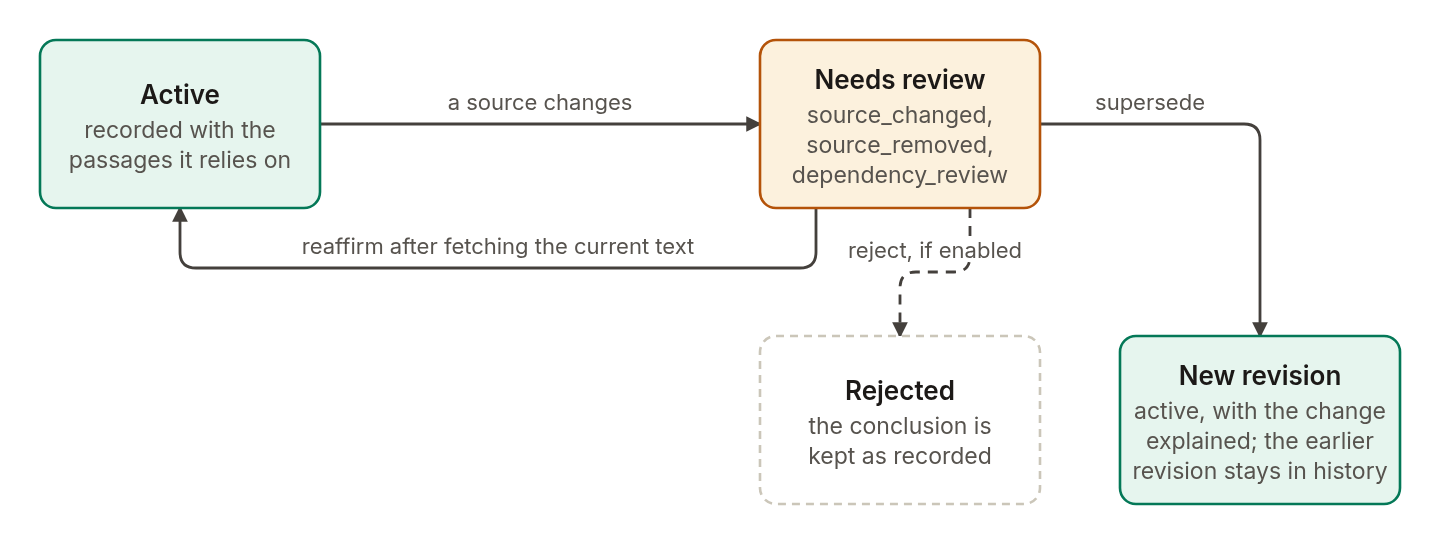
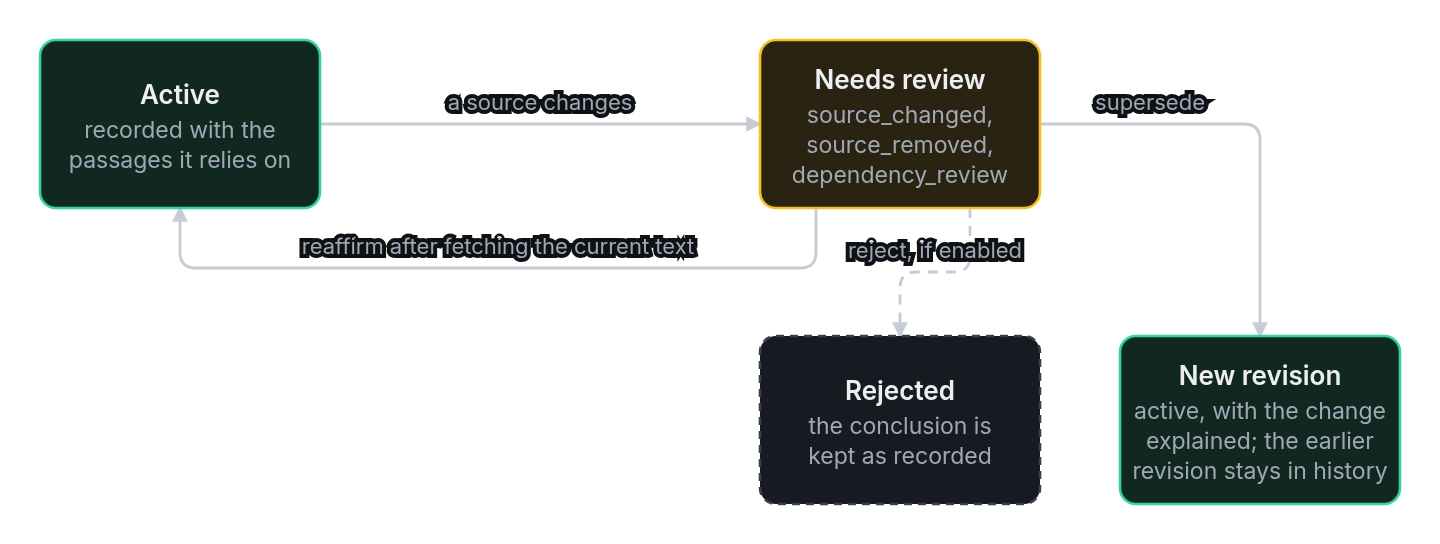
Decision traces are structured records of conclusions, rationale, assumptions, open questions, and explicit supports. When a supported document changes, Agentic GraphRAG flags the affected decision for review. A reviewer can reaffirm it with current evidence or replace it with a new revision.
Requirements
- A disposable Neo4j database configured with the
NEO4J_*variables. - The
docling,extract,neo4j, andagentsextras. - An OpenAI-compatible model endpoint configured with
AGENT_LLM_BASE_URL,AGENT_LLM_API_KEY, andAGENT_LLM_MODEL_IDfor the agent stages. - Network access to download the pinned annual report and required models on the first run.
Install the extras in a checkout of the repository:
uv sync --extra docling --extra extract --extra neo4j --extra agents
The workflow stores the PDF and parsed document in ~/.cache/agentic-graphrag/company-briefing by default. Set AGRAG_EXAMPLE_DATA_DIR to use another directory. It does not store the report in the repository or alter the pinned source.
Run the company briefing
The example uses one source, Boeing's FY2022 Form 10-K. It does not establish independent corroboration, compare companies, or assess current business conditions. The source URL, reporting period, page locations, and SHA-256 are recorded in the example manifest. The canonical filing is available from the SEC.
Use a disposable graph. Each stage writes graph data, conversation history, or decision traces. The commands do not clear the graph.
Run each stage from the repository root in order:
-
Verify and ingest the pinned report.
uv run python -m examples.company_briefing.workflow prepareThe stage checks the report's SHA-256, reads it with
DoclingPdfLoader, and adds it withGraph.addunder the stable keyboeing-fy2022-annual-report. Repeating the stage updates the same document instead of creating a second document. -
Search the company graph and run the first agent invocation.
uv run python -m examples.company_briefing.workflow investigateThe stage uses
entity_searchandexplore_relationshipsto inspect company and segment entities. It searches and fetches the reported-revenue passage, then usesnavigate_document_treeto read nearby table context. The built-in agent uses the same document scope and begins taskboeing-fy2022-briefing. Its middleware records the actual messages, tool calls, and tool results. -
Resume the task and record a supported decision.
uv run python -m examples.company_briefing.workflow resumeThis separate invocation asks the agent to finish the industry-risk section. The stage prints events in sequence order, the task view, and the validity of completed results. It then fetches the report passage about commercial-airline exposure and records a decision with that evidence, explicit assumptions, and an open question. The stage reads the saved decision and its support history through
get_decisionandlist_support_history. -
Restore a missing report paragraph and review the decision.
uv run python -m examples.company_briefing.workflow reviewThe stage creates a clearly labeled local derivative that omits the risk paragraph. It ingests the derivative under the same document key, which flags the supported decision. It then restores the pinned report, fetches the current cyclicality passage, and supersedes the earlier decision. Both the old support and the new support remain inspectable.
The staged commands print structured results as JSON. Entity extraction and agent answers depend on their configured models, so the exact output can vary. Check the source-backed passages and reporting period before using any generated summary.
Understand the decision record
DecisionTraces.record_decision stores a conclusion with one or more support references. For document supports, the caller must pass the fetched evidence outcomes as well as the evidence ids. This proves the supports refer to readable source versions. A rationale is a concise record attached to the decision; it is not hidden model reasoning.
When the source changes, list_decisions_for_review returns affected decisions with a review state and reason. get_decision reads a decision in its project. list_support_history reads its current and superseded support records. supersede_decision preserves the old decision and records a new revision after the caller fetches current evidence.
The source-change example changes only a local derivative. It does not imply Boeing restated its filing. The restored report remains the pinned FY2022 source.
Related
- Find and cite evidence covers evidence search, fetch, and citation checks.
- Update and delete documents explains how document versions change and how removed sources behave.
- Run the MCP server describes the tools for reading and writing history and decisions through MCP.