Run the MCP server
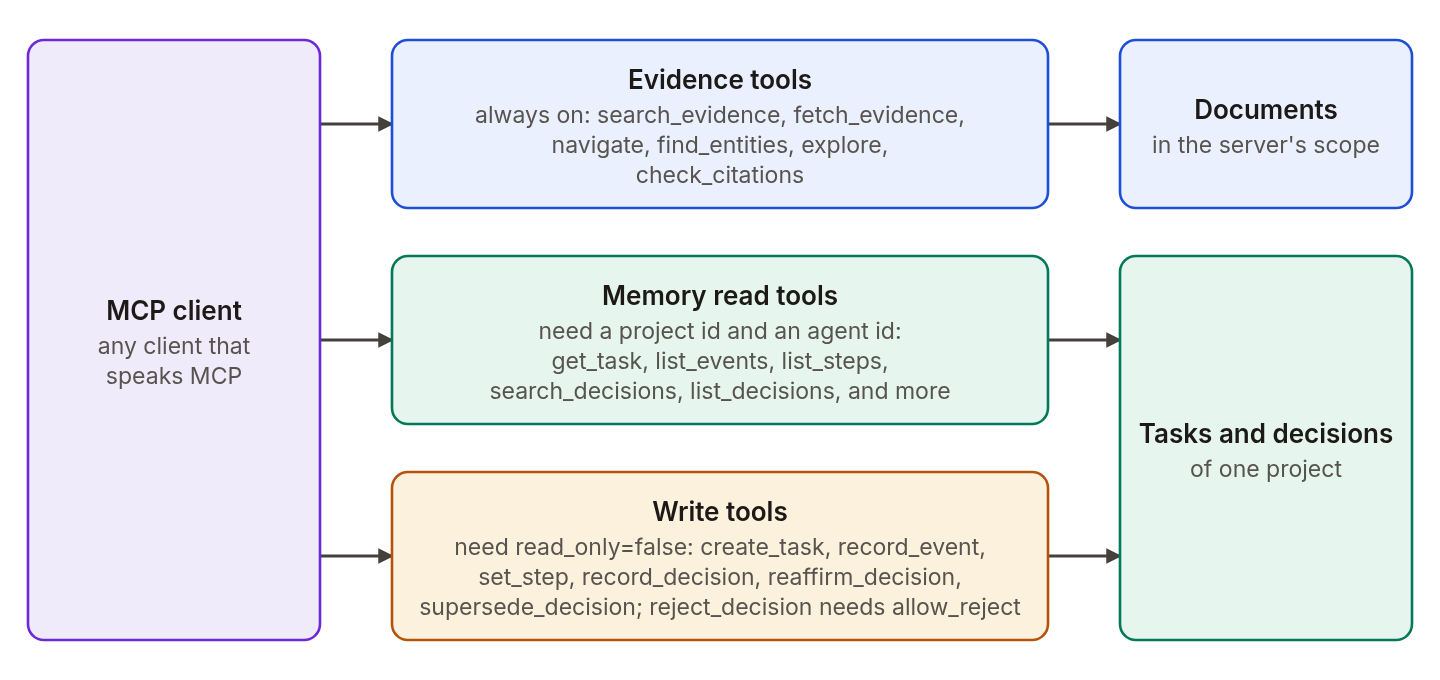
The agrag-mcp command runs a local stdio server. An MCP client such as an IDE assistant or a desktop chat app uses it to search the documents in your graph, read the exact text behind each result, check citations, and keep task and decision memory.
Before you start
- A graph that already holds your documents. See Ingest documents.
- The extras for the server and the graph store:
uv pip install "agentic-graphrag[neo4j,mcp]"
- The
NEO4J_*variables for the graph, and theEMBEDDING_MODELyou used for ingestion. Semantic and hybrid search embed the query with the same model.
Choose the documents the server can read
Set AGRAG_MCP_SCOPE_DOCUMENT_KEYS to a comma-separated list of document keys. The server reads only those documents, and a tool call cannot widen the list. A document you added from a file has the resolved absolute path as its key, for example /home/you/notes/policy.md. A document you added with graph.add(text=...) has a key of the form inline://<16-hex-hash>. A prebuilt Document uses its uri as the key unless you set document_key yourself. To choose a readable key, give the document a stable uri or set document_key explicitly.
Add the server to your client
Add an entry like this one to the MCP configuration of your client:
{
  "mcpServers": {
    "agrag": {
      "command": "agrag-mcp",
      "env": {
        "NEO4J_URI": "bolt://localhost:7687",
        "NEO4J_USERNAME": "neo4j",
        "NEO4J_PASSWORD": "your-password",
        "AGRAG_MCP_SCOPE_DOCUMENT_KEYS": "/home/you/notes/policy.md"
      }
    }
  }
}
The server starts read-only. It loads the embedding model on the first semantic or hybrid search. Logs go to stderr, and stdout carries only protocol messages.
Read evidence
These tools work with only a document scope.
| Tool | What it does |
|---|---|
search_evidence | Finds passages by full-text search, semantic search, or both. Each hit has an evidence id. |
fetch_evidence | Returns the exact text for evidence ids, with the title, source, and version status. |
navigate | Moves from a passage to its parent, children, siblings, previous or next chunk, or table context. |
find_entities | Finds entities and the passages that mention them. |
explore | Follows the relations of an entity. |
check_citations | Checks cited ids against the ids this session fetched. |
fetch_evidence also returns a citation_markdown field for complete fetches. Use it to build a numbered claim reference and a Sources list in your client's answer. The server keeps the fetched ids in memory for the session, and check_citations compares against them.
Keep task and decision memory
Set AGRAG_MCP_PROJECT_ID and AGRAG_MCP_AGENT_ID to turn on the memory tools. Tasks and decisions belong to the project, and the agent id is recorded as the author of each write.
The read tools are get_task, list_events, fetch_event, list_steps, search_decisions, list_conflicts, get_decision, list_support_history, list_decisions, and list_needing_review.
To let the client write, set AGRAG_MCP_READ_ONLY=false. The write tools are create_task, record_event, set_step, record_decision, supersede_decision, reaffirm_decision, and continue_review_propagation. The request-based writes take a request_id, and a retry with the same id returns the saved result. continue_review_propagation takes a bounded limit instead. A decision lists the evidence it rests on, and the server accepts document evidence that the same session fetched. Set AGRAG_MCP_ALLOW_REJECT=true to add reject_decision.
Document scope applies to evidence reads. Task and decision tools act on the configured project.
Tune the limits
The server caps what it returns. A result states when it left items out.
| Variable | Default | Limits |
|---|---|---|
AGRAG_MCP_MAX_HITS | 10 | Hits per search. |
AGRAG_MCP_MAX_SNIPPET_CHARS | 240 | Characters in one snippet. |
AGRAG_MCP_MAX_FETCH_CHARS | 4000 | Characters for each fetched id. |
AGRAG_MCP_MAX_FETCH_IDS | 20 | Ids in one fetch or citation check. |
AGRAG_MCP_MAX_RESPONSE_CHARS | 60000 | Characters in one result. |
AGRAG_MCP_REQUEST_DEADLINE_SECONDS | 30.0 | Seconds for each store read. |
The Configuration reference lists every variable.
Related
- How-to: Find and cite evidence calls the same operations from Python.
- How-to: Record decisions and review them.
- Explanation: Retrieval.