Document tree navigation
navigate_document_tree returns the passages near a passage you already have, each with its own evidence id.
| Python function | navigate_document_tree |
| Built-in agent tool | navigate_document_tree |
| MCP tool | navigate_document_tree |
| Required inputs | evidence_id and relation. Python also needs store, scope, limit, and max_chars. |
| Optional inputs | limit (default 10) and max_chars (default 12000) |
| Returns | A NavigationResult with items |
| Needs | An evidence id from a search, an entity hit, or an earlier navigation |
| Reads | The document version that the evidence id names |
| API reference | agrag.evidence.navigate_document_tree |
Overview
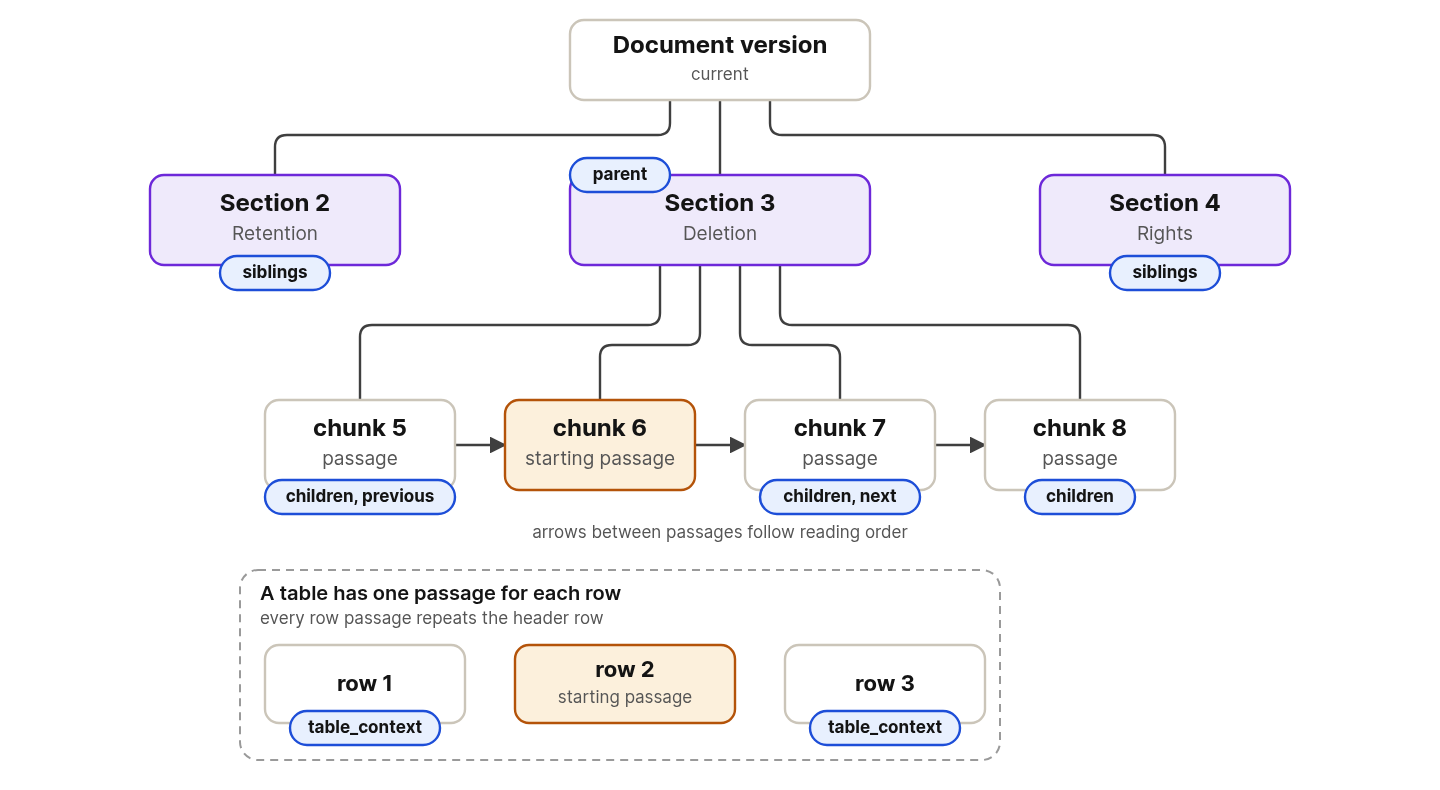
A search hit is one chunk. The chunk can start mid-section, end inside a table, or hold an answer whose condition sits in the paragraph before it. This tool follows the structure that ingestion recorded, which is sections, reading order, and table rows.
Every returned passage belongs to a document in scope and to the same document version as the starting passage. The tool does not search. It cannot find a passage that you cannot already name with an evidence id.
Pick the relation that matches what you need.
| Relation | Returns | Use it when |
|---|---|---|
parent | The section that holds the passage, as that section's first passage, with its heading path. A chunk that spans two sections gives two items, and multi_section is true. | You need the section title of a passage before you cite it. |
siblings | The other sections under the same parent section, each as its first passage. A section with no current passage is left out, because it has nothing to cite. | You want to see what else the document says on neighboring topics. |
children | The other passages under the same parent node, in reading order, without the starting passage. The parent can be a section or a table. It returns no_match when the section holds only one chunk. | You want everything under a heading after one good hit. |
previous | The passage before the starting passage in reading order. At most one item. | A hit begins partway through an idea. |
next | The passage after the starting passage in reading order. At most one item. | A hit ends partway through an idea. |
table_context | The table passage, with the row passages before and after it when the table spans several chunks. Every table passage repeats the header rows. A table that fits in one chunk returns itself, and a passage that is not a table gives no_match. | A hit is part of a table and you need the rows around it. |
Navigation returns text, and returned text does not count as fetched. The built-in agent and the MCP server accept a citation only for ids that a fetch_evidence call returned in full. Call fetch evidence on the ids you plan to cite.
Example
The examples use the notes from Set up the example, and they reuse store, embedder, scope, and short from that page. Outputs come from a real run, and your ids differ.
Find the passage about route planning, then ask for its section, its sibling sections, its children, and the passage after it:
found = await search_evidence(
    store,
    embedder,
    "Who plans the delivery routes?",
    mode=EvidenceSearchMode.HYBRID,
    limit=1,
    scope=scope,
)
chunk_id = found.hits[0].evidence_id
for relation in (
    NavigationRelation.PARENT,
    NavigationRelation.SIBLINGS,
    NavigationRelation.CHILDREN,
    NavigationRelation.NEXT,
):
    result = await navigate_document_tree(
        store, chunk_id, relation, scope=scope, limit=5, max_chars=2000
    )
    items = [(i.kind, i.heading_path[-1], short(i.evidence_id)) for i in result.items]
    print(f"{relation.value:<9} {result.status.value:<9} {items}")
parent    ok        [('text', 'Route planning', 'ev1:c:f24b301d...3e66aa77'), ('text', 'Dependencies', 'ev1:c:f24b301d...3e66aa77')]
siblings  ok        [('text', 'Data retention', 'ev1:c:f24b301d...d7c4d6ef')]
children  no_match  []
next      ok        [('table', 'Dependencies', 'ev1:c:f24b301d...12cd16fb')]
Read each line against the notes.
parentreturns the same chunk twice, once for each section it holds. The loader put "Route planning" and "Dependencies" in one chunk, somulti_sectionis true.siblingsreturns the one section that the starting chunk does not hold, "Data retention".childrenfinds no other passage under the same parent, because each section holds one chunk, so the status isno_match.nextreturns the table, which is the following chunk and haskindtable.
Read a table
table_id is the id that the next call returned, which is result.items[0].evidence_id after the loop above. table_context on that chunk returns the table with its header:
result = await navigate_document_tree(
    store, table_id, NavigationRelation.TABLE_CONTEXT, scope=scope, limit=5, max_chars=2000
)
print(result.status.value, [(i.kind, i.heading_path[-1]) for i in result.items])
print(result.items[0].text)
ok [('table', 'Dependencies')]
| Component | Owner | Purpose |
| --- | --- | --- |
| Orion Planner | Maria Chen | Plans delivery routes |
| Orion Maps | Daniel Okafor | Serves warehouse floor maps |
| Fleet Monitor | Priya Raman | Tracks robot battery and health |
The whole table fits in one chunk, so the result holds only that chunk. A long table spans several chunks, and each one repeats the header row.
Limit the text
max_chars caps the text of a result. Ask for the next passage with a budget of 80 characters:
result = await navigate_document_tree(
    store, chunk_id, NavigationRelation.NEXT, scope=scope, limit=5, max_chars=80
)
print(result.truncated, result.truncation_reason.value, result.items[0].text_truncated)
print(repr(result.items[0].text))
True chars True
'| Component | Owner | Purpose |\n| --- | --- | --- |\n| Orion Planner | Maria Chen'
The text stops at 80 characters, and text_truncated and truncation_reason say why. Fetch the id with a larger max_chars to read the rest.
Usage
In Python
Call navigate_document_tree as in the example above. Python needs the connected store, an evidence_id, a relation, the scope, a limit from 1 to 50, and a max_chars from 1 to 20000.
In the built-in agent
The agent calls navigate_document_tree on its own when a passage is cut off. The agent version caps limit at 50 and max_chars at 20000.
On the MCP server
An MCP client calls navigate_document_tree with the relation spelled in lowercase.
{"evidence_id": "ev1:c:f24b301d-f73a-5291-9d80-7ea3cbd5291c:c174f9d9eba7d79c:440441fc-6865-5391-8e02-a44c3e66aa77", "relation": "next", "limit": 3, "max_chars": 4000}
The parameter ranges and the MCP caps are in the navigation parameters.
Result
An item has these fields.
| Field | Meaning |
|---|---|
evidence_id | The id of the passage. Pass it to fetch_evidence, to check_citations, or back to this tool. |
document_key | The document that holds the passage. |
heading_path | The headings above the passage, from the outermost down. |
kind | text for running text and table for a table passage. |
text | The passage text, cut to the character budget of the call. |
text_truncated | True when the text was cut to fit the budget. |
location | Page numbers, and character offsets when the loader recorded them. |
The result also has status, truncated, truncation_reason, version_status, and multi_section.
| Status | Meaning |
|---|---|
ok | At least one item is returned. |
no_match | The passage exists and the relation has no items for it. |
unavailable | The id names no evidence this caller may read. |
malformed | The id does not decode. |
failed | The store failed while reading the neighbors. |
The call applies limit and then the max_chars budget. The first item that does not fit is cut to the remaining budget and marked text_truncated, and later items are dropped. truncation_reason is limit when more items existed and chars when the text budget ran out. version_status reports whether the version of the starting passage is current or superseded.
Full JSON of the siblings result
This is result.model_dump_json(indent=2) for the siblings call in the example.
{
  "status": "ok",
  "items": [
    {
      "evidence_id": "ev1:c:f24b301d-f73a-5291-9d80-7ea3cbd5291c:c174f9d9eba7d79c:efae06f9-f4e7-5a7a-af99-d7f5d7c4d6ef",
      "document_key": "/home/you/acme-notes.md",
      "heading_path": ["Acme Robotics engineering notes", "Data retention"],
      "kind": "text",
      "text": "Data retention\n\nRobot logs are kept for 30 days and then deleted. A customer can ask Acme Robotics to erase their delivery data. After the request is verified, the data is deleted within 10 business days.",
      "text_truncated": false,
      "location": { "char_start": null, "char_end": null, "page_numbers": [] }
    }
  ],
  "truncated": false,
  "truncation_reason": null,
  "version_status": "current",
  "multi_section": true,
  "detail": null
}
Related
- Chunking describes how documents are cut into the passages that this tool moves between.
- Fetch evidence reads the neighbors you plan to cite.
- Find and cite evidence runs this tool from Python.